
Ham Radio Remote Audio Level Settings
This post is about how to set the alsamixer audio levels for remote ham radio operation.
What is the alsamixer is a text-based, graphical mixer program for the Linux terminal, designed to configure sound settings and adjust volume levels for the Advanced Linux Sound Architecture (ALSA). It runs directly in the command line using an ncurses interface, making it useful for systems without a desktop GUI to set audio levels.
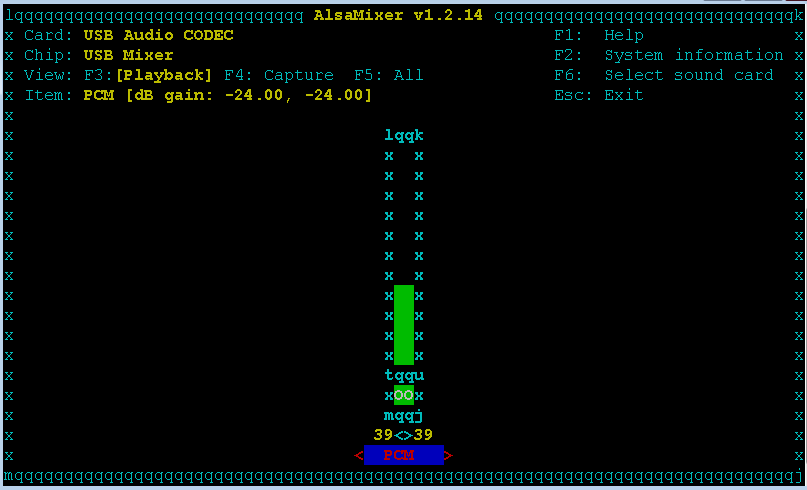
The Audio Issue
What's causing this little bit of audio noise on the spectrum scope when the PTT button is pressed.
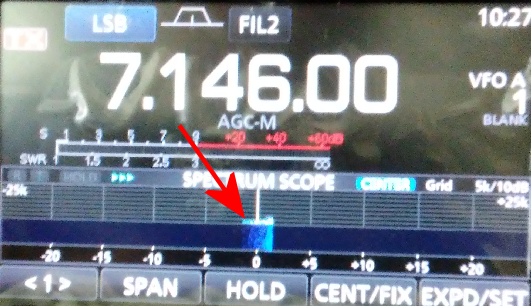
Here is what I found
The noise was caused by the USB Audio adapter Speaker level being to high.
To fix this:
Will use the alsamixer command:
- SSH in to the Raspberry Pi
- alsamixer
- Use the up/down arrows keys increase/decrease the PCM level to minimize the noise on the spectrum scope when the PTT button is pressed. To fix this decrease the PCM level.
- Press Esc to exit the alsamixer
To save the alsamixer setting
sudo alsactl store
Conclusion
The above shows the alsamixer UI for the Icom IC-7300, every radio has it's own alsamixer UI. below is the alsamixer UI Yaesu FT-710 .
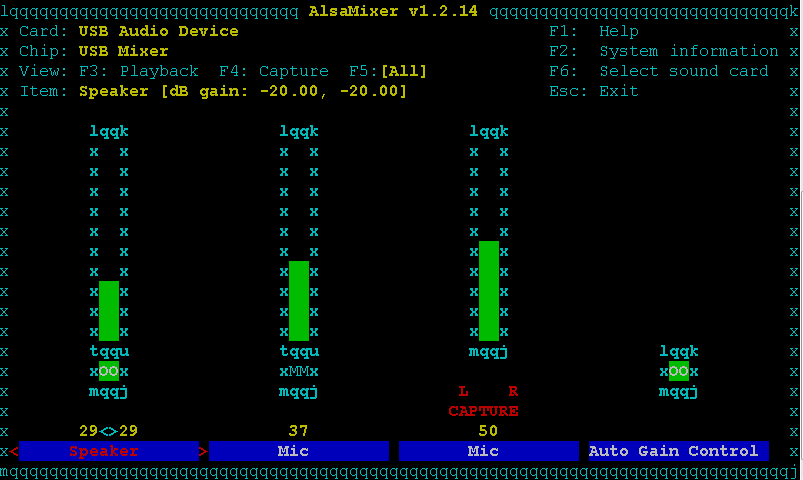
- Use the right/left arrows keys to Highlight 'Speaker' or 'Mic' or 'Capture'.
- Use the up/down arrows keys increase/decrease the audio levels.
- Press [F5] to display 'CAPTURE' Mic.
- Press Esc to exit the alsamixer
To save the alsamixer setting
sudo alsactl store